Ollama/OpenWebUI & N8N
I wanted to finally spin up a dedicated VM to run an AI stack so I can experiment within my own lab without worrying about tokens and the dreaded cloud. I chose Ubuntu as my distro for this to keep things simple and assigned the VM 16Gb of ram, 8 cores, and passed through the 1070 FTW card from the host.
TL;DR
- Old GPU made vLLM a no-go, so I went Ollama + OpenWebUI instead
- Gemma3:4b ran instantly, 12b was slower to start but usable once it got going
- nginx reverse proxy needed WebSocket support or things got weird
- N8N is not just for AI, it is basically the glue and boilerplate for workflows
- Next step is FreshRSS -> N8N -> model summary -> email to myself
- Later I’ll look at piping Wazuh + Prometheus into a “top 3 things to look at” report
The Pain of Old Hardware
The 1070 is almost a decade old, so I should have been less surprised to run into various issues with drivers and engines when trying to install vLLM. I ended up bailing on vLLM and opted for the classic Ollama and OpenWebUI stack instead.
The Ollama stack installed without much fuss, and after realizing I forgot WebSocket support in my nginx reverse proxy, I now had my own local AI at my own domain in the homelab working.
services:
  ollama:
    image: ollama/ollama:latest
    container_name: ollama
    restart: unless-stopped
    ports:
      - "11434:11434"
    volumes:
      - ./data/ollama:/root/.ollama
    deploy:
      resources:
        reservations:
          devices:
            - driver: nvidia
              count: all
              capabilities: [gpu]

  open-webui:
    image: ghcr.io/open-webui/open-webui:main
    container_name: open-webui
    restart: unless-stopped
    depends_on:
      - ollama
    ports:
      - "3000:8080"
    environment:
      - OLLAMA_BASE_URL=http://ollama:11434
    volumes:
      - ./data/openwebui:/app/backend/data
Is This Thing On??
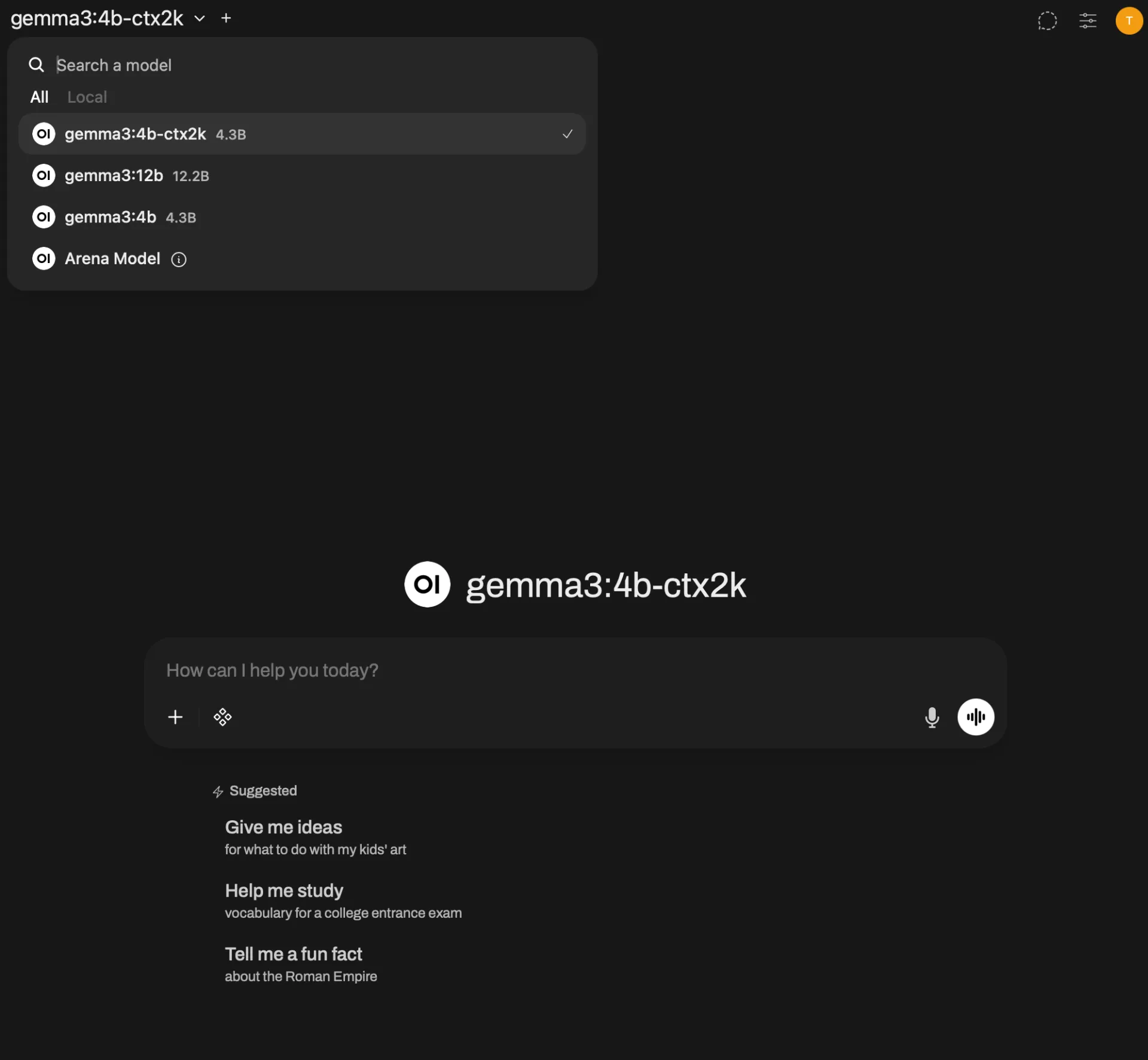
I installed Gemma3:4b which worked without a single tweak out of the box, and had performance I was pretty happy with. I then tried the 12b model and despite the time to first token being quite a bit longer, once the LLM started, the text kept flowing at what I’ll call an acceptable rate.
While troubleshooting the “no output when using an FQDN” problem, I even tried shortening the context window on the 4b model, which is something I had not done before. I find this interesting because while it was not useful for troubleshooting, if you are solving a niche problem you might be able to sneak a much larger model onto your system if you reduce the context window. That would free up more VRAM to keep the model in memory.
N8N Install
The plan is to put N8N on my main Docker host VM. I chose to make a separate VM for the model so the GPU passthrough was on a clean VM and if OOM happened for one reason or another (or a system crash), I would not take all my other services offline.
I tried doing this in Portainer, but the example compose repos from N8N did not really work in Portainer due to having dependencies outside of .env and docker-compose.yml. I ended up just SSH-ing into the host and manually creating the needed files. Once completed, it started without issue.
volumes:
  db_storage:
  n8n_storage:

services:
  postgres:
    image: postgres:16
    restart: always
    environment:
      - POSTGRES_USER
      - POSTGRES_PASSWORD
      - POSTGRES_DB
      - POSTGRES_NON_ROOT_USER
      - POSTGRES_NON_ROOT_PASSWORD
    volumes:
      - db_storage:/var/lib/postgresql/data
      - ./init-data.sh:/docker-entrypoint-initdb.d/init-data.sh
    healthcheck:
      test: ['CMD-SHELL', 'pg_isready -h localhost -U ${POSTGRES_USER} -d ${POSTGRES_DB}']
      interval: 5s
      timeout: 5s
      retries: 10

  n8n:
    image: docker.n8n.io/n8nio/n8n
    restart: always
    env_file:
      - .env
    environment:
      - DB_TYPE=postgresdb
      - DB_POSTGRESDB_HOST=postgres
      - DB_POSTGRESDB_PORT=5432
      - DB_POSTGRESDB_DATABASE=${POSTGRES_DB}
      - DB_POSTGRESDB_USER=${POSTGRES_NON_ROOT_USER}
      - DB_POSTGRESDB_PASSWORD=${POSTGRES_NON_ROOT_PASSWORD}
    ports:
      - 5678:5678
    links:
      - postgres
    volumes:
      - n8n_storage:/home/node/.n8n
    depends_on:
      postgres:
        condition: service_healthy
First N8N Flow
Initially I did not think it was all that overwhelming to get started, then I realized the flow I was building was not using AI and just relied on traditional logic.
I decided to use ChatGPT for a tutorial on how to build out a simple flow using the local AI. We did a simple “summarize” along with adding a priority to the “outage” mentioned in the prompt. This worked fairly well once wired up, but overall felt useless to implement at any sort of scale within the homelab. It is not that vast or complex (imo) that I need an LLM to contextualize the data.
Why Is Everyone Using N8N?
After that quick demo, I did not understand why anyone was using N8N. This just seemed like a low-code solution for people that did not want to handle logs, error handling, and organizing the functions in the traditional sense via code.
After some further research and comparisons to things like Kubernetes being “just YAML over containers,” I realized the benefit of N8N was not the piping to LLMs, or being “low code.” The reason N8N is so hyped up is because it eliminates the boring process of gluing all your data, actions, and outputs together.
The other useful thing is that N8N can export entire configurations as JSON, making a workflow entirely modular.
OK, But Now What?
Now that I had everything piped up, working, and corrected my understanding of what N8N even was, I still had one more thing to solve.
What the hell was I even going to build with this now?
Most ideas I had were either way more scope than I wanted for a first project, or did not really have a need for AI, which was the aspect I wanted to use. Most things in my lab are not “contextual” since most things are intended. Stuff like performing updates is still better handled via Ansible playbooks, and I do not see the value in telling an agent “update the lab” and having it run the playbook that does that.
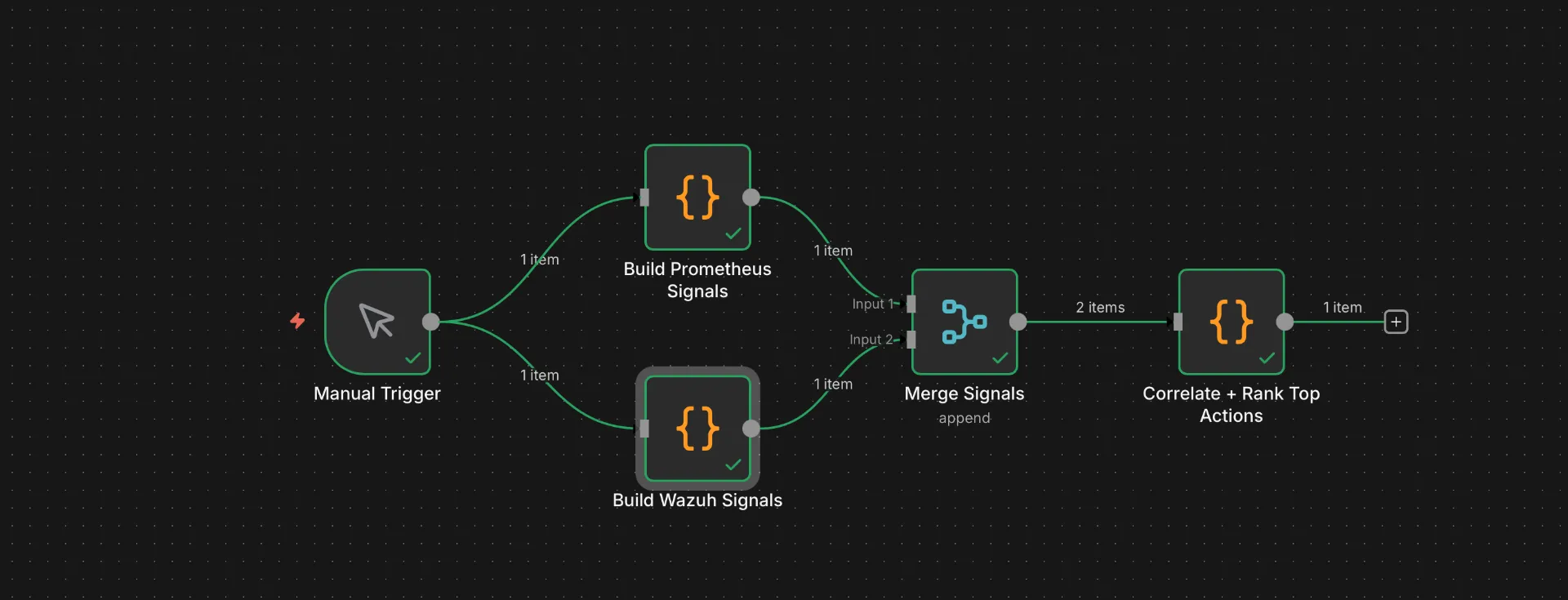
Instead of picking something reasonable, I decided to query the logs of Wazuh and Prometheus, feed that to an LLM that is instructed to output the top 3 most critical “get your eyes on this” items for me to look at.
Certs Are Always the Problem
The biggest headache I seem to end up with in projects like this is SSL auth complaining about things being self-signed, or not being part of whatever config file I set up 2 years ago.
I understand the need for this style of fail-safe when things are production or publicly deployed, but I wish there was just a TurnOffAllTheSecurityExtras=true flag. It probably exists somewhere in dev configs, but I have not gone looking.
This is also a reminder that my certificate strategy is basically “shut the f*** up and load,” and I should probably fix that.
Takeaways?
I clearly need to learn more about my reverse proxy and how certs are applied. I also desperately need to have a network diagram or tool to make some of this easier, because I want to implement even more firewall rules for some of these more “testing” projects. I want some of the steps to feel more like a real production environment.
The biggest thing that was nice about this sprint is that I have a lot of the groundwork done for spinning up new VMs. I have templates in Proxmox, and I was already familiar with Docker commands and Docker Compose.
The notable thing was, well, I took notes in the form of this blog as I went rather than trying to capture my thoughts after the build.
Overall, from “I should mess with N8N, but do it all locally” to having it at least running (including some tests) was probably only about 5 hours. That includes time to download the models and test networking, including setting up nice names to resolve locally like llm.tannerdoestech.com for OpenWebUI.
Finally, I now have a much better understanding of N8N. I went into this thinking it was mainly a tool to leverage AI. That is not the case at all, since N8N more takes on the role of middle-man for building pipelines for data.
While I see the appeal for a lot of people, this still feels like another abstraction layer that a lot of people could probably roll on their own for any large stable projects. Granted, N8N to me is perfect for the startup and the homelab. It allows rapid prototyping and testing without needing to deal with a bunch of annoying boilerplate. Let’s be real, who wants to keep copying and pasting the same boilerplate over and over.
Should I Try N8N Though???
Yes. Granted, I always like trying new and shiny things.
The more practical use case I think I have for N8N is letting a model read through my RSS feed via freshRSS, then pass me the most notable articles based on a preset prompt, and email it to me 3 times a day. News aggregation is something I think most people can benefit from, and since you could start with a single RSS feed, it should not be too complex.
Final Tally
- 3 large, strong cups of coffee
- ~5–6 hours of work, including install, build times, making coffee
- A mix of Skrillex and Rezz for most of the duration
- 2 “idk what I did, guess I’ll nuke it and try again”
Thanks for stopping by, stay caffeinated. ☕️
Keep exploring
Find more builds like this
Follow related tags or subscribe via RSS so the next lab experiment lands in your reader automatically.